
Receive Deposits
This guide outlines the process for accepting deposits into a unique address created for the transaction.
It provides a detailed walkthrough of the deposit process, including how it interacts with the respective blockchain, the prerequisites for creating an asset pool and a webhook destination for payment event updates. Once the pre-steps are completed, the process outlines which endpoint is used to create the address, the data required to be sent to the endpoint, and how the funds are consolidated into a master address belonging to the asset pool after the deposit is received. Additionally, it covers the webhooks sent out during the withdrawal process.
To integrate address deposits, you must complete the following steps:
- Set up the webhook destination to send payment update webhooks and any other related events.
- Create the asset pool that will house the created address and keep track of all funds sent to any related addresses created in future.
- Create a new crypto Address for the desired currency. The final address is sent to the earlier webhook destination.
- Ingest and deserialise the resulting webhooks to keep track of:
- Created address
- Status of the deposits sent in
- Total amount of funds in your pool
- Movement of funds within your asset pool
To summarise, this deposit process involves the following:
- Sending funds to a wallet address that has been created and linked to your asset pool.
- Once deposits are sent to the address, the Layer1 system will pick up the transaction, and the deposit status will be updated via webhooks.
- Once funds have been recorded within the asset pool, a consolidation phase will occur, transferring the funds into a master wallet so that they can be easily sent out as required.
Deposit flow
The deposits pass through the following lifecycle on the Layer1 platform:
- Once a payment is first detected on the blockchain, a transaction with type DEPOSIT and status DETECTED is created.
- The respective blockchain will process the transaction and check for errors.
- If errors are found (YES), then the DEPOSIT is assigned as FAILED, as this action is irreversible.
- If no errors are found (NO), the DEPOSIT status is updated to UNCONFIRMED and is monitored until the desired confirmation threshold is reached. For more information on confirmation thresholds, see FAQs
- Once the required number of confirmations is reached, the DEPOSIT is moved to the CONFIRMED state.
- Another check is made to determine whether the transaction needs to be screened for fraudulent activity.
- If NO checks are required, the state changes to SUCCESS and the funds become available within the asset pool.
- If the transaction must be screened (YES), the state is updated to SCREENING_REQUESTED.
- An automatic screening check is performed.
- If the funds can be released (YES), the state changes to SUCCESS and the funds are available within the asset pool.
- If Travel Rule is enabled and the screening provider determines that originator or beneficiary information is missing or incomplete, the DEPOSIT is set to HELD. The transaction will include a
requiredActionof typeMISSING_COMPLIANCE_DETAILS. To unblock the deposit, submit the missing compliance data via the address actions endpoint. The deposit is automatically re-screened once the data is provided and released if screening passes.
For tag-based networks (Ripple/XRP, TRON, Solana), if the destination tag itself is missing, the deposit is held before screening begins with arequiredActionof typeMISSING_TAG, and a tag must be created first. - Otherwise (NO), the DEPOSIT is held for manual review and set to the HELD state.
- The deposit is then checked for manual approval.
- If the DEPOSIT is checked and found to be eligible for approval, the screening can be APPROVED. The DEPOSIT state changes to SUCCESS. The funds become available within the asset pool.
- If the DEPOSIT is eligible for return, you can trigger RETURN from the HELD status. This will update the DEPOSIT to REJECTED and create a new RETURN WITHDRAWAL.
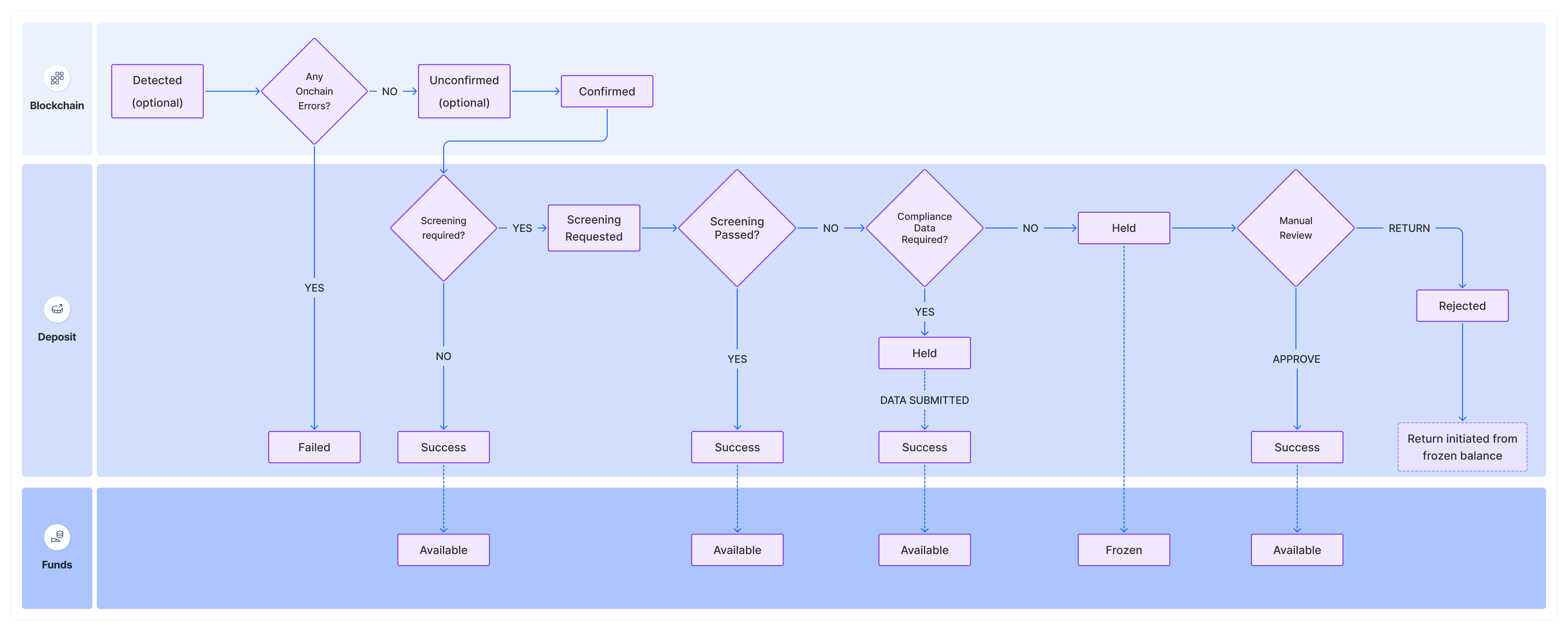
Deposit Statuses
A Deposit will go through a series of statuses in the deposit workflow:
| Status | Description |
|---|---|
Detected | The deposit has been detected and distributed on the blockchain, but does not yet have any confirmations. Optional |
Failed | The deposit failed due to an on-chain error during execution, which could have multiple underlying causes. |
Unconfirmed | The deposit has had one or more blockchain confirmations, but has not yet reached the required confirmation limit. Optional |
Confirmed | The deposit has reached the required confirmation limit and is not fully confirmed on the blockchain. If you have a confirmation threshold of one block, you will always get a confirmed event. |
Screening_Requested | The deposit has been flagged by the compliance provider and requires screening. |
Held | The deposit has been held for manual review after screening, or because Travel Rule is enabled and compliance data (originator/beneficiary information or a destination tag) is required before screening can proceed. Check the requiredAction field on the transaction to determine next steps. |
Success | The deposit has been processed, and the funds are available in the asset pool. |
Rejected | The deposit was not found eligible for approval and was rejected. |
Updated 2 months ago
What’s Next
Now that you understand the different statuses and processes that a transaction goes through, you can set up your system to start receiving deposits as shown in the following guides.